 Blurwise
Why a face in a video is personal data
Under the GDPR, an image that identifies a person is personal data, and a video is thousands of such images. A school filming an end-of-year show, a company recording a training session, a council publishing footage of a public meeting, a researcher collecting interviews: each of them is processing personal data and has to have a reason to do so.
When some of the people on screen have not agreed to appear, the usual answer is to make them unrecognisable. Anonymised footage is no longer about identifiable people, so it is far easier to share and keep.
Why processing it locally matters
Many anonymisation services work online: you upload the video, their servers blur it, you download the result. That means handing identifiable footage to a third party, which is itself processing personal data, usually under a data processing agreement and subject to wherever their servers are.
Blurwise runs entirely on your Windows PC. The video is analysed and exported on your machine, even with no internet connection, so the identifiable original never leaves your computer or your organisation. There is no provider to vet for this step, because there is no transfer.
How it works in Blurwise
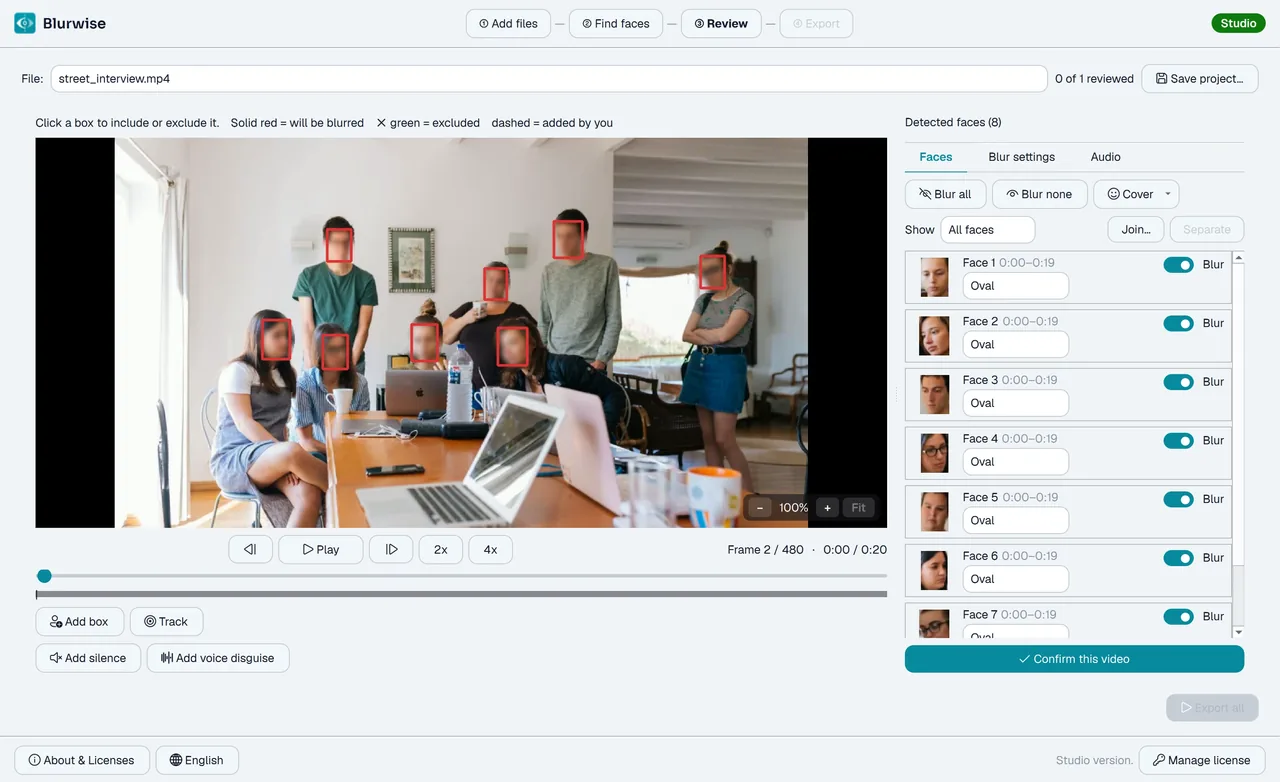
You add the videos and photos, Blurwise finds and tracks every face with a neural network running on your PC, and then you review them. Each person is one row: blurred or left visible, for the whole clip. The preview shows the real result, exactly as it will be exported.
- Faces the detector was unsure about are marked “Check”, so you look at them twice.
- A face it missed can be added by hand and tracked from there (Pro and Studio).
- Location, device and date metadata are removed from every export, on every version.
- A name or address said out loud can be silenced, and voices disguised irreversibly (Studio).
- Studio can write a record with the SHA-256 of the source and the result, to show later what was anonymised and when.
What it does not do for you
Blurwise is a tool, not a legal opinion. Whether a video needs anonymising, and how thoroughly, depends on your situation: the people in it, why you are publishing it, what your data protection officer advises. Blurwise makes the anonymisation itself fast and keeps it on your premises; the assessment remains yours.
Frequently asked questions
Does blurring the faces make a video GDPR-compliant?
It removes one of the main ways people are identified, which is often what is needed, but compliance depends on the whole context: voices, names on badges, places and captions can identify people too. Blurwise covers faces, objects you mark, voices and audio stretches; what is enough in your case is for you or your data protection officer to judge.
Is anything sent to Blurwise’s servers?
No video, photo or frame. The app only goes online to activate or release a licence, and when you ask it to check for updates.
Can I prove later what was anonymised?
With Studio, yes: next to each export it writes a record with the SHA-256 fingerprint of the source and of the result, so anyone holding the files can check they match.
Which version do I need?
Free handles one video at a time, up to 2 minutes and 1080p. Pro removes the limits and adds faces drawn by hand, object tracking and several files at once. Studio adds voice disguise, audio silencing, the anonymisation record and a licence for client work.
Read the step-by-step guide, with a screenshot of every stage →